How many of you have heard about the service called QoS or Quality of Service ?
It is a service by windows to enhance it’s usablity and service. It has many layers and it does everything to give you the best from microsoft. Microsoft says ;-
Quality of Service (QoS) is a set of technologies for managing network traffic in a cost effective manner to enhance user experiences for home and enterprise environments. QoS technologies allow you to measure bandwidth, detect changing network conditions (such as congestion or availability of bandwidth), and prioritize or throttle traffic.
But This service also reserve 20% of the fixed bandwidth available for its own updates and access to the Microsoft Servers. This simply means that they are not allowing us to use these fixed bandwidth.

So, It also says that If you remove this, you can increase the internet speed in your computer (windows 7) up by 20% !
We don’t say that you can feel a ‘double power’ in your internet speed.
But there could be some difference and since this trick has no adverse effects, It’s far safer and better to use this trick and increase the internet speed in your win 7 PC.
How to increase internet speed in windows 7 ultimate ?
This is really simple process. You just need to spend a couple of minutes
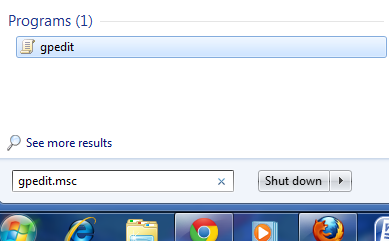
1) Go to Run (or you can use the search bar in start menu) and Then type gpedit.msc and hit Enter
Now you a window called “Local Group Policy Editor” window. In the window, Navigate to Computer Configuration -> Administrative Templates. Now it’s branches will be shown on the right side, navigate and select the network from it.
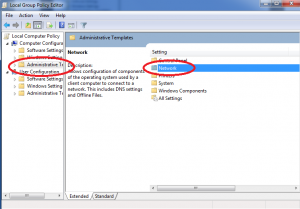
Expand the Network and double click QoS Packet Scheduler on the right hand side

Now select the Limit reservable bandwidth and open it
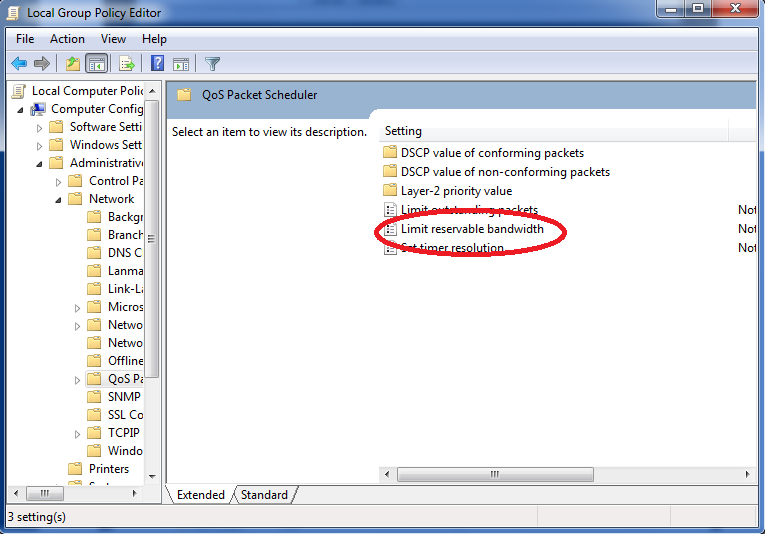
Double click on ”Limit reservable bandwidth”
In the window that appears, select “Enabled” and change the “Bandwidth limit (%):” from 20 to 0.”
Click Apply and you are done.
Now you can enjoy Internet at the maximum speed of your bandwidth.
NB: Some Additional Tips to speed up the internet speed in windows had been added
You can use the follow mentioned ways also to Increase the internet speed in windows 7 ;-
- Look up for Bandwidth eaters like Anti-virus, Softwares that updates automatically, Torrents etc
- Clean up your PC and temporary Files
- Disable Flash in your Browser
- Use Internet speed Optimizers (Just google them ! )
- Do not open new windows, It is faster when opened in same Window
- AVOID the default versions of Internet Explorer










